Support for Your AI BOX
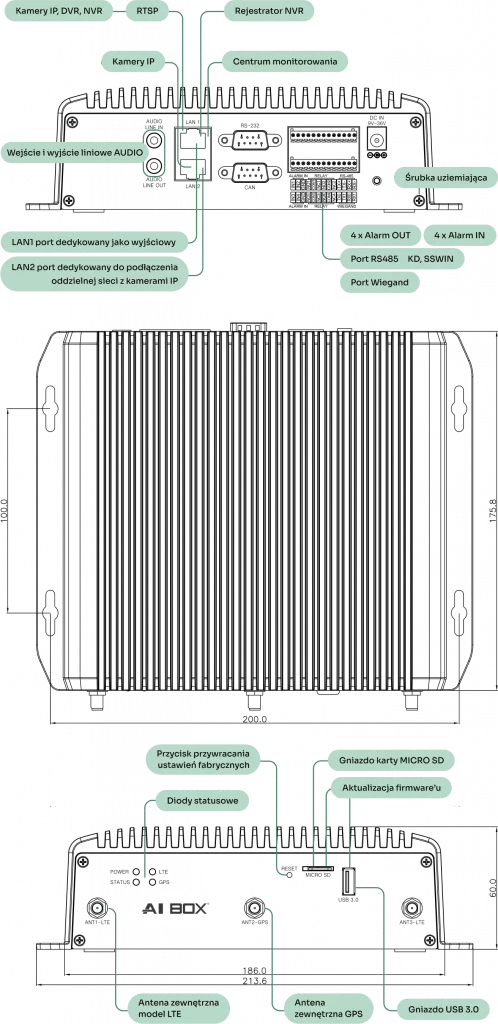
Two independent built-in network cards allow one AI BOX port to be connected directly to the on-site CCTV (VSS) network without any conflicts, while the second port can be used, for example, to provide connectivity to a monitoring station.
The set of alarm inputs/outputs is programmable. An input can be used, for example, to arm the device or send an alarm to a monitoring station. Outputs, in turn, can control another on-site system after previously programmed conditions occur. The AI BOX is powered by 9-36VDC (power supply included).
RS-232/RS-485 and CAN ports can be used for communication between external devices and AI BOX PRO. The device also supports two-way audio.
In addition to network cards, the device features an LTE modem and a GPS module, making it independent of external routers, and the built-in hard drive allows for storing recordings.
Easy-to-configure and intuitive AI video analysis applications
Easy AI system design using existing CCTV cameras
AI-based multi-level false alarm reduction
High-performance position estimation technology
Accurate event detection through scene understanding
Multiple AI applications can be run on each video channel
Easy integration with other systems
Web-based configuration
Enhanced security options
Combining rules with other events
Supports up to 16 channels
LTE (optional)
This document contains essential information that should be known when starting up and configuring the AIBOX device.
PDF file, 5.35 MB
AI BOX PRO (8/16 channels) Datasheet
A document describing all the most important device parameters, functional capabilities, as well as photos and illustrations of the AI BOX.
PDF file, 561 KB
CE Declaration
A document describing all the most important changes introduced in subsequent firmware versions for the AI BOX device.
AI BOX 4-PRO (4-channel) Datasheet
A datasheet describing device parameters, functional capabilities, as well as photos and illustrations.
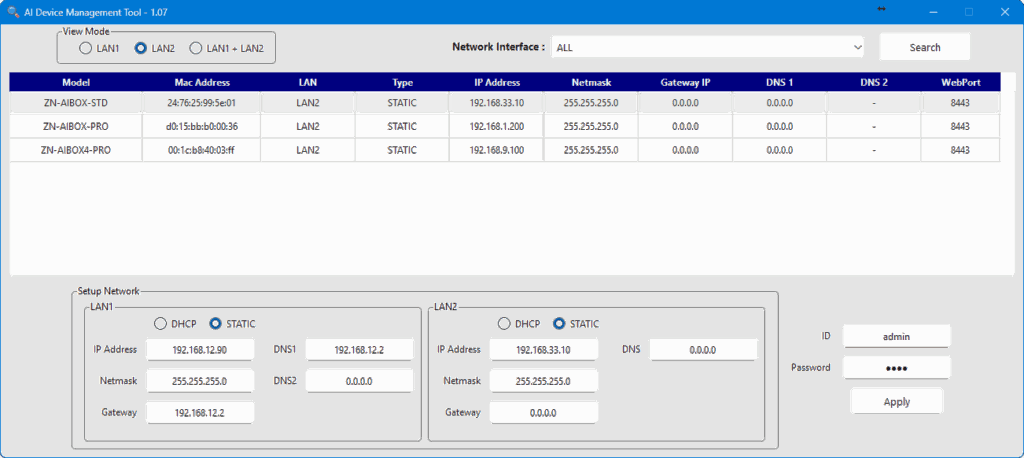
The software allows searching for AI BOX devices on the network and configuring IP addresses. After launching the application, a firewall settings window will appear. To ensure smooth operation, it is recommended to allow access to the entire network.
AI BOX Management Tool Software
creating a list of objects and adding devices
monitoring device status (e.g., connection time, uptime, FW version)
tool for defining AI analytics detection range
receiving all system and alarm events
quick preview and editing of selected configuration settings in devices
group configuration (copying configuration from one to many)
firmware update management (manual | automatic | group)
arming/disarming devices
review of alarm images from recent alarms
LIVE image preview from individual channels of monitored devices
The most important video stream parameters affecting the proper operation of the AI BOX are discussed. It should be remembered that the AIBOX analyzes the content of video streams obtained from another system. Therefore, efforts should be made to ensure proper video stream parameters are provided to the AI BOX.
The operating principles of the Intrusion Detection and Loitering Detection functions are explained in detail. A comparative analysis of both functions in various situations is presented, and recommendations are provided for the proper selection of the appropriate function for the monitored zone.
The individual steps of the procedure for adding an AI BOX device to the ALICE system are discussed and presented.
The procedure for adding an AI BOX device to the SAFESTAR system is discussed.
Upload your video via the contact form*, and we will analyze it in terms of: